Github
Fundamentos
Github es una plataforma de desarrollo colaborativo y un sistema de control de versiones de proyectos y sus archivos.
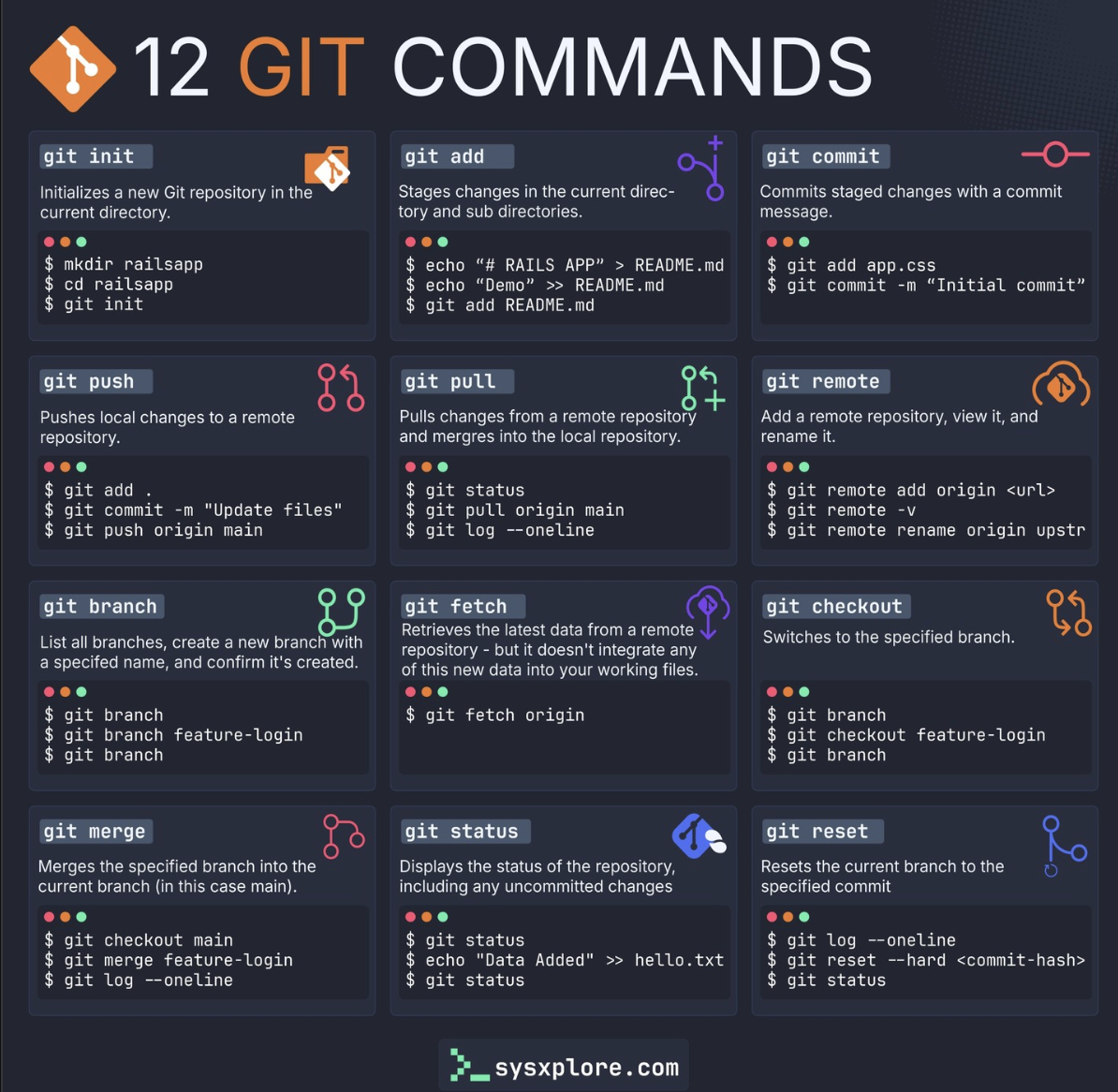
El sistema de control de versiones es una herramienta que rastrea cada modificación en el código, creando un historial completo del proyecto. Se tiene la posibilidad de volver atrás a versiones preliminares. La imagen anterior resume, en una sola vista, casi todos los comandos que se explican en este artículo: los primeros para configurar Git, los del centro para registrar cambios (add, commit, push) y los de la derecha para trabajar con ramas y con el repositorio remoto.
Git (sistema de control, Git) difiere de la plataforma (GitHub) en aspectos como:
- Git
- Sistema de control de versiones distribuido (software)
- Funciona de manera local en tu computadora
- Es una herramienta de línea de comandos
- Es gratuito y de código abierto Creado por Linus Torvalds en 2005
- Permite rastrear cambios, crear ramas, fusionar código
- Funciona sin conexión a internet No requiere cuenta ni registro
- GitHub
Plataforma web para alojar repositorios Git
Funciona en la nube (repositorios remotos)
Tiene interfaz gráfica web
Ofrece planes gratuitos y de pago
Fundado en 2008, comprado por Microsoft en 2018
Agrega funcionalidades colaborativas: pull requests, issues, code review, GitHub Actions, wikis, etc.
Requiere conexión a internet .Necesitas crear una cuenta
Configuración
Antes de usar Git hay que decirle quién eres: cada commit queda firmado con el nombre y el correo configurados en tu máquina, así que este es siempre el primer paso.
- Puedes comenzar a aprender aquí: https://github.com/skills/introduction-to-github
- Configuración inicial:
git config(nombre de usuario y correo).
Recursos de ayuda
Estos son los recursos oficiales de GitHub para aprender el flujo de trabajo paso a paso, resolver dudas puntuales de sintaxis y configurar Git por primera vez desde la terminal:
- GitHub Skills. Link <— recomendado para aprender el flujo de trabajo!
- GitHub Documentation. Link
- GitHub Community. Link
- Instalación y Configuración (Git SCM Book)
Definiciones
Antes de entrar en los comandos, conviene fijar el vocabulario: repositorio, commit, rama, pull request y las demás piezas que se combinan en un flujo de trabajo con Git y GitHub aparecen definidas en la sección Repositorios, a continuación, y en el glosario oficial aquí.
Repositorios
¿Qué es un repositorio? Un repositorio es un proyecto que contiene archivos y carpetas. Un repositorio registra las versiones de archivos y carpetas. Para más información, consulta “Acerca de los repositorios” en la documentación de GitHub.
Repositorio local: Es un directorio local que contiene los archivos de código del proyecto.
Repositorio remoto: Es una versión en línea del repositorio local alojada en servicios como GitHub, GitLab y BitBucket.
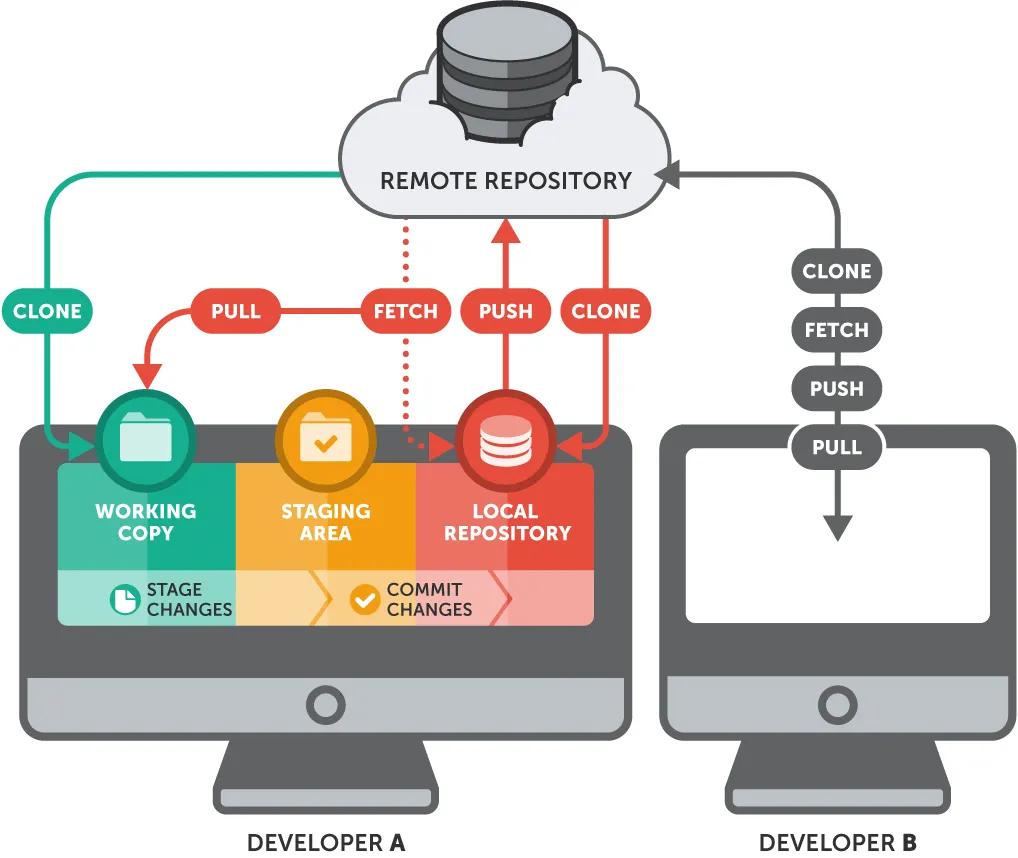
Clonación (clone): Es la acción de crear un clon o copia de un repositorio en un nuevo directorio sea local o en la nube.
Confirmación (Commit): Es una instantánea de los cambios del proyecto en preparación.
- Guarda los cambios realizados en los archivos del proyecto.
- Incluye un mensaje descriptivo que explica qué cambios se hicieron y por qué
- Tiene un identificador único (hash)
- Registra quién hizo los cambios y cuándo
Confirmar y subir/enviar (Commit and push): Es el proceso de guardar los cambios locales mediante un commit y luego enviarlos (push) al repositorio remoto para compartirlos con otros colaboradores o publicarlos como página web.
De forma similar a guardar un archivo editado, una confirmación registra los cambios en uno o más archivos de tu rama. Git asigna a cada confirmación un ID único, llamado SHA o hash, que identifica:
Los cambios específicos
Cuando se hicieron los cambios
Quién creó los cambios
Rama (Branch): Una rama es una versión paralela de tu repositorio. Por defecto, tu repositorio tiene una rama con nombre main, que se considera la rama definitiva. Crear ramas adicionales te permite copiar la mainrama de tu repositorio y realizar cambios de forma segura sin interrumpir el proyecto principal. Muchas personas usan ramas para trabajar en funciones específicas sin afectar a otras partes del proyecto. Los cambios (commits) deben aprobarse por el administrador del repositorio o del proyecto a través de un pull request.
Las solicitudes de cambiosson propuestas para combinar los cambios de código en un proyecto. Una “pull request” es la característica de colaboración fundamental de GitHub, que le permite discutir y revisar los cambios antes de fusionarlos. Esto ayuda a los equipos a trabajar juntos, detectar problemas al principio y mantener la calidad del código.
Fusión en Git (Git merge): El proceso de combinar dos ramas en Git. Una fusión añade los cambios de la solicitud de extracción y la rama a la
mainrama. Para más información sobre las fusiones, consulta ” Fusionar una solicitud de extracción “.
¿Qué es un pull request?: La colaboración se lleva a cabo en una solicitud de extracción . Esta solicitud muestra los cambios en tu rama a otras personas y permite aceptarlos, rechazarlos o sugerir cambios adicionales. En una comparación, esta solicitud conservará los cambios que acabas de realizar en tu rama y propondrá su aplicación a la mainrama del proyecto. Para más información sobre las solicitudes de extracción, consulta “Acerca de pull request”.
Archivo .gitignore: Es un archivo que especifica los archivos no rastreados intencionalmente que Git debe ignorar.
Área de preparación: Una caché que contiene los cambios que se incluirán en la próxima confirmación.
Almacenamiento temporal de Git: Otro tipo de caché que contiene cambios no deseados a los que quizás quieras volver más adelante.
HEAD (siempre en mayúsculas): un nombre de referencia para la última confirmación, para evitar que tenga que escribir los identificadores de las confirmaciones.
Infografía: el flujo de trabajo de Git y GitHub
Todas las definiciones anteriores encajan en un mismo recorrido. Un cambio nace en tu directorio de trabajo, pasa por el área de preparación y el repositorio local, y termina en el repositorio remoto; y cuando ese cambio se hace en una rama, se integra a main a través de un pull request. El siguiente diagrama resume ambos recorridos.
Del archivo al repositorio remoto
El recorrido de un cambio, del directorio de trabajo a GitHub
(staging)
(GitHub)
De la rama al merge
Cómo se integra el trabajo de una rama a main
git checkout -bgit commitgit pushproponer los cambios
code review
git mergeComandos comunes de Git usados en distintas situaciones
Esta clasificación sigue la que usa el propio git help, agrupando los comandos según el momento del flujo de trabajo en el que se usan: iniciar un espacio de trabajo, trabajar sobre el cambio actual, examinar el historial, hacer crecer el historial común y colaborar con un repositorio remoto.
Iniciar un área de trabajo
(ver también: git help tutorial)
git clone
Clona un repositorio en un nuevo directorio.git init
Crea un repositorio Git vacío o reinicializa uno existente.
Trabajar sobre el cambio actual
(ver también: git help everyday)
git add
Añade el contenido de archivos al índice (staging area).git mv
Mueve o renombra un archivo, un directorio o un enlace simbólico.git restore
Restaura archivos del árbol de trabajo.git rm
Elimina archivos del árbol de trabajo y del índice.
Examinar el historial y el estado
(ver también: git help revisions)
git bisect
Usa búsqueda binaria para encontrar el commit que introdujo un error.git diff
Muestra los cambios entre commits, entre un commit y el árbol de trabajo, etc.git grep
Imprime las líneas que coinciden con un patrón.git log
Muestra el historial de commits.git show
Muestra distintos tipos de objetos.git status
Muestra el estado del árbol de trabajo.
Hacer crecer, marcar y ajustar el historial común
git backfill
Descarga objetos faltantes en un clon parcial.git branch
Lista, crea o elimina ramas.git commit
Registra cambios en el repositorio.git merge
Une dos o más historiales de desarrollo.git rebase
Reaplica commits sobre la punta de otra base.git reset
Restablece el HEAD actual al estado especificado.git switch
Cambia entre ramas.git tag
Crea, lista, elimina o verifica una etiqueta firmada con GPG.
Colaborar
(ver también: git help workflows)
git fetch
Descarga objetos y referencias desde otro repositorio.git pull
Obtiene cambios e integra desde otro repositorio o una rama local.git push
Actualiza referencias remotas junto con los objetos asociados.
Comandos de Git por nivel de dificultad
Esta chuleta organiza los comandos de Git y GitHub CLI en orden de complejidad creciente: del nivel básico —configurar Git y hacer tu primer commit— al intermedio, con ramas, conflictos, rebase y automatización con GitHub Actions.
Nivel básico
Configuración inicial
#Instalarlo con Homebrew
instalar el GitHub CLI primero. Voy a instalarlo usando Homebrew.
`brew install gh`
`gh auth login` para autenticarse
# Configurar nombre y email
git config --global user.name "Tu Nombre"
git config --global user.email "tu@email.com"

# Ver configuración
git config --list
Crear y clonar repositorios
# Inicializar repositorio
git init

# Clonar repositorio
git clone https://github.com/usuario/repositorio.git

# Clonar con nombre específico
git clone https://github.com/usuario/repositorio.git mi-proyecto
Comandos esenciales
# Ver estado
git status

# Agregar archivos
git add archivo.txt
git add .  # Agregar todos

# Hacer commit
git commit -m "Mensaje descriptivo"

# Ver historial
git log
git log --oneline --graph
Trabajar con remotos
# Ver remotos
git remote -v

# Agregar remoto
git remote add origin https://github.com/usuario/repo.git

# Push
git push origin main

# Pull
git pull origin main
Nivel intermedio
Branching (Ramificación)
Crear y cambiar ramas
# Crear rama
git branch nombre-rama

# Cambiar a rama
git checkout nombre-rama

# Crear y cambiar en un comando
git checkout -b nueva-rama

# Cambiar de rama (forma moderna)
git switch nombre-rama
git switch -c nueva-rama  # Crear y cambiar
Fusionar ramas
# Fusionar rama en la actual
git merge nombre-rama

# Fusionar con squash (combinar commits)
git merge --squash nombre-rama

# Abortar merge conflictivo
git merge --abort
Eliminar ramas
# Eliminar rama local
git branch -d nombre-rama  # Solo si está fusionada
git branch -D nombre-rama  # Forzar eliminación

# Eliminar rama remota
git push origin --delete nombre-rama
Manejo de conflictos
# Ver archivos con conflictos
git status

# Después de resolver manualmente
git add archivo-resuelto.txt
git commit -m "Resolver conflicto"

# Usar herramienta de merge
git mergetool
Rebase interactivo
# Rebase interactivo de últimos 3 commits
git rebase -i HEAD~3

# Rebase sobre otra rama
git rebase main

# Continuar después de resolver conflictos
git rebase --continue

# Abortar rebase
git rebase --abort
Stash (Guardar cambios temporalmente)
# Guardar cambios
git stash
git stash save "Mensaje descriptivo"

# Ver stashes guardados
git stash list

# Aplicar último stash
git stash apply
git stash pop  # Aplicar y eliminar

# Aplicar stash específico
git stash apply stash@{2}

# Eliminar stash
git stash drop stash@{0}
git stash clear  # Eliminar todos
Cherry-pick (Seleccionar commits específicos)
# Aplicar commit específico a rama actual
git cherry-pick abc123

# Cherry-pick múltiples commits
git cherry-pick abc123 def456

# Cherry-pick sin hacer commit automático
git cherry-pick -n abc123Comandos útiles avanzados
Git reflog (Recuperar commits)
# Ver historial de referencias
git reflog

# Recuperar commit perdido
git checkout abc123
git reset --hard abc123
Git diff avanzado
# Diferencias entre ramas
git diff main..feature

# Diferencias de archivos específicos
git diff HEAD -- archivo.txt

# Diferencias con estadísticas
git diff --stat
Git reset y revert
# Deshacer último commit (mantener cambios)
git reset --soft HEAD~1

# Deshacer último commit (descartar cambios)
git reset --hard HEAD~1

# Revertir commit creando nuevo commit
git revert abc123
GitHub CLI (gh)
# Instalar GitHub CLI
# macOS: brew install gh
# Windows: winget install GitHub.cli

# Login
gh auth login

# Crear repositorio
gh repo create nombre-repo --public

# Crear PR
gh pr create --title "Nueva feature" --body "Descripción"

# Ver PRs
gh pr list
gh pr view 123

# Clonar repos
gh repo clone usuario/repositorio
GitHub Actions básico
# .github/workflows/ci.yml
name: CI

on:
  push:
    branches: [ main ]
  pull_request:
    branches: [ main ]

jobs:
  test:
    runs-on: ubuntu-latest
    steps:
      - uses: actions/checkout@v3
      - name: Set up Python
        uses: actions/setup-python@v4
        with:
          python-version: '3.10'
      - name: Install dependencies
        run: |
          pip install -r requirements.txt
      - name: Run tests
        run: pytest
Trabajo colaborativo
Pull Requests
# Crear rama para feature
git checkout -b feature/nueva-funcionalidad

# Hacer cambios y commits
git add .
git commit -m "Agregar nueva funcionalidad"

# Push de la rama
git push origin feature/nueva-funcionalidad

# Luego crear PR en GitHub web o con gh cli
gh pr create
Code Review
# Ver cambios de PR
gh pr checkout 123
gh pr diff 123

# Comentar en PR
gh pr comment 123 --body "Se ve bien!"

# Aprobar PR
gh pr review 123 --approve

# Mergear PR
gh pr merge 123
.gitignore avanzado
# Python
__pycache__/
*.py[cod]
*$py.class
*.so
.Python
env/
venv/

# IDEs
.vscode/
.idea/
*.swp

# OS
.DS_Store
Thumbs.db

# Logs
*.log
logs/

# Environment variables
.env
.env.local

# Build
dist/
build/
*.egg-info/
GitHub Pages
# Crear rama gh-pages
git checkout --orphan gh-pages

# Agregar contenido
git add .
git commit -m "Initial GitHub Pages"

# Push
git push origin gh-pages

# Configurar en Settings → Pages
Otros temas
Git no fue pensado originalmente para archivos binarios grandes ni para el formato JSON de los notebooks de Jupyter; por eso GitHub documenta un tratamiento especial para diferenciarlos y revisarlos correctamente:
Videos tutoriales recomendados
Una selección de video-tutoriales en inglés, organizados por nivel, para complementar los comandos anteriores con explicaciones paso a paso:
Nivel básico
Nivel intermedio
GitHub específico
Proyectos destacados en GitHub
Más allá de la documentación oficial, estos repositorios de código abierto son referencias prácticas y de uso frecuente en la comunidad de Git y GitHub, agrupados por lo que resuelven.
Recursos de aprendizaje
Herramientas Git/GitHub
Utilidades de línea de comandos que extienden lo que Git hace por defecto:
GitHub Actions
Complementan la sección de GitHub Actions básico, más arriba, con ejemplos ya construidos y con el conjunto de herramientas para crear tus propias Actions:
Automatización y CI/CD
Herramientas que automatizan tareas del flujo de trabajo colaborativo que, de otro modo, dependen de recordar hacerlas manualmente en cada commit o cada release:
Perfiles y documentación
Para la cara visible de un repositorio o de un perfil de GitHub:
- github-profile-readme-generator - Generador de README perfil Link
- awesome-readme - Ejemplos de READMEs increíbles Link
- shields - Badges para repositorios Link
GitHub Copilot
GitHub Copilot es el asistente de programación con IA integrado en el editor (VS Code, JetBrains, Neovim, o directamente en github.com), que sugiere líneas o bloques de código completos a partir del contexto del archivo y responde preguntas sobre el repositorio en un chat integrado:
Recursos adicionales
Para profundizar más allá de esta introducción: